VRay v1.2.5.1-Cinema 4DWindows/MacOSX


Ulead VideoStudio 11.5.0157.2.

VideoStudio Editor has everything you need for creating stunning home video. Detailed Procedure can do creative work, not wasting time learning technical editing.
Movie Wizard is ideal for beginners to video editing. Use a variety of topics and the possibility of auto-editing create a professional opening sequence quality. With Smart Pan and zoom, you can quickly create entertaining photo slideshows. Need only three steps to get the finished film.
Master recording DV-to-DVD The fastest way from DV to format DVD. Simply connect your camcorder and select the videos. In just two steps to create a DVD-ROM with menus, titles, transitions and music.
Total High
Definition Maximizing your HD camcorder, widescreen TV and surround sound system. Easily create a high-definition video and high-definition DVD titles with the best quality picture and sound.
Plus Multiple Overlay Tracks and expandable timeline
Creating movies with picture-in-picture and montage effects (with up to six lanes).
Wizard templates movies with the ability to overlay multiple tracks
Automatic creation of opening sequences and movies with picture-in-picture overlays, music and titles.
Surround sound in Dolby Digital 5.1
Thanks to the surround sound Dolby Digital 5.1 home movies will sound like in the cinema.
Auto Color and Tone filters
Automatic adjustment of video, recorded in low light.
Filters eliminate more pixels, and "snow"
Removing digital noise and more pixels that have emerged as a result of compression.
MPEG Optimizer
Suggests encoding settings to ensure the best quality and speed.
Tool for DVD-ROM drive
Creating a fully interactive motion menus and submenus DVD or HD DVD *, including 16:9 widescreen. Customize menus by resizing and positioning buttons. Smooth transition from the menu to content DVD, and menu filters which allow you to create movement even on static menus, for professional results.
MPEG-4 and H.264
Use of output templates for creating video for iPod ®, PSP ™, Zune ™, Smartphones, PDAs and other portable devices. Player InterVideo ® WinDVD ® Player included with this player you can share your standard and high definition (AVCHD, MPEG-2 HD / WMV-HD) right from your computer.
Roxio Creator 2010 - PRO Full version

The worlds favorite digital media suite lets you easily capture, enhance, save and share your photo, video and audio projects. Burn and copy CDs, DVDs or Blu-ray discs. Edit movies and burn DVDs like a pro. Rip CDs, digitize analog LPs, mix perfect playlists. Create photo slideshows, cards, calendars, panoramas and more. Share your creations on CD, DVD, mobile phone, iPod or YouTube. Built-in video tutorials and printable step-by-step instructions make it easy and fun to get started.
PRO builds on Creator's extensive capabilities with these five digital media must-haves: High-def Blu-ray Disc Plug-in for Blu-ray video authoring; SonicFire® Pro custom soundtrack creation; SoundSoap™ SE audio noise reduction; LightZone™ photo editing with Zone Mapping & Relight and BackOnTrack disaster recovery.
Easily capture, enhance, save and share your photo, video and audio projects
* Burn and copy CDs, DVDs or Blu-ray discs
* Edit movies and burn DVDs like a pro
* Rip CDs, digitize analog LPs, mix perfect playlists
* Create photo slideshows, cards, calendars, panoramas and more
* Share your creations on CD, DVD, mobile phone, iPod or YouTube
PRO builds on Creator's extensive capabilities with these five digital media must-haves
* High-def Blu-ray Disc Plug-in for Blu-ray video authoring
* SonicFire® Pro custom soundtrack creation
* SoundSoap™ SE audio noise reduction
* LightZone™ photo editing with Zone Mapping & Relight
* BackOnTrack disaster recovery
•Roxio Creator 2010 Pro includes tools for creating preserving, and sharing video, audio and photos
•Built-in High-Def/Blu-ray Disc authoring lets you capture high-def video footage from AVCHD or HD camcorders and TiVo DVRs--create Blu-ray Discs or standard DVDs with HD content that can be played on any standard Blu-ray Disc player
•Includes SmartSound Sonicfire Pro for easily orchestrating music tracks, BIAS SoundSoap SE for removing unwanted audio noise, LightZone for enhancing photos, and BackOnTrack 3 for backing up your files
•Easily capture and convert your standard, HD or AVCHD video, audio or photo files to enjoy on DVD, on your big screen TV, online, or on portable devices like your iPhone and more
•Choose professionally-designed styles and themes for your photos then add fun effects and music--share online with family and friends, or even order it on DVD
Key Features :
•5 times faster video encoding
•Capture streaming website video like YouTube
•Take HDV videos from camera directly to DVD
•Create movie magic in minutes
•VideoWave editing suite includes a powerful 32-track timeline
•DVDCustomize
•Take your TiVo to-go
•Drag, drop, burn
•Improved! Convert video for portable devices
•Setting the industry standard for burning
•Safe and sound backup
•Copy everything, copy faster
•Create custom DVD video compilations
•Build an iTunes library
•Preserve old LPs and tapes
•Convert CD audio-books for your iPod
•Identify your audio…automatically
•Create mixes for any occasion
•Enhance audio with Sound Editor
•Photo Projects – Cherished for a Lifetime
•Create dazzling online slideshows
•Turn snapshots into sweeping panoramas
•Picture-perfect in seconds
•Put every photo at your fingertips
•Optimize photos for your mobile device
•Private online sharing
•Share with the world
Input Formats:
* Video: AVI, DV, HDV, DV-AVI, MPEG-1/2/4, MPEG2-HD, DVD-Video, IFO/VOB, XviD, DVR-MS, TiVo, ASF, MOV, WMV, QuickTime, 3GP, MPEG2 Transport Stream, AVC (H.264), AVCHD
* Audio: Audio CD, MP3, WAV, WMA, Dolby® Digital AC-3, AAC, Ogg Vorbis, FLAC, M4A, MP4, Playlists (WPL, ASX, M3U, PLS, XSPF)
* Image: JPG, PNG, TIFF, BMP, GIF
Output Formats:
* Video: AVI, DV-AVI, HDV, MPEG-1/2/4, MPEG2-HD, WMV, WMV HD, AVC (H.264), MP4, 3GP
* Audio: MP3, WAV, WMA, Dolby Digital AC-3, Ogg Vorbis, FLAC, MPEG-1/2, M4A, M4B AAC, Playlists (M3U, PLS, XSPF, WPL)
* Image: JPG, PNG, TIFF, BMP, GIF
* Video disc formats: DVD, Video CD (VCD), Super Video CD (SVCD), Mini DVD
Recordable Formats:
* CD-R/RW, DVD+R/RW, DVD-R/RW, DVD-R DL, DVD+R DL, DVD-RAM, BD-R/RE, BD-R/RE DL
* Disc image formats: read ISO, C2D, BIN/CUE and GI; write ISO and GI
Pinnacle Avid Liquid 7.2 Pro
Avid Liquid’s powerful SD and HD video editor offers integrated DVD authoring
Avid Liquid’s powerful SD and HD Video Editor offers integrated DVD authoring; Surround sound audio processing and 1000s of powerful real-time effects. Liquid’s integrated toolset provides all of the tools needed to create the highest quality productions and finish to tape, DVD or web streams.
Editing, effects, authoring, and more –
Avid Liquid’s powerful video editor integrates DVD authoring, surround sound audio processing and powerful visual effects.
Complete HDV Workflow -
Liquid features Frame-accurate editing of HDV content. Liquid's real-time effects engine provides multiple streams of HDV, video monitoring with Liquid Pro and a Smooth workflow for finishing in SD or back to HDV tape.
Format flexibility -
Liquid supports Avid Open Timeline. Liquid lets videographers edit DV, MPEG I-frame, MPEG IBP, uncompressed, Windows Media, DIVX and MPEG-4 in SD as well as HDV.
Smooth DVD Production -
Edit, create titles and effects and then dive into a DVD authoring toolset that lets users define the interactivity, create menus, add a Dolby Digital 5.1 surround mix and then burn a finished DVD.

Adobe Premiere Pro CS5 FINAL
Adobe� Premiere� Pro CS5 software offers breakthrough performance for video production, enabling you to work dramatically faster thanks to the revolutionary native 64-bit, GPU-accelerated Adobe Mercury Playback Engine. Work natively with the video formats you want and accelerateproduction from scriptwriting to editing, encoding, and final delivery.
Tap the power of tapeless workflows
Save time with industry-leading native tapeless workflows, which eliminate transcoding and rewrapping, while preserving the pristine quality of your footage. Capture and log footage from virtually any camera � including tapeless cameras � with Adobe OnLocation� CS5.
Work better with other NLEs
Import and export Apple Final Cut Pro and Avid projects in Adobe Premiere Pro so you can explore new possibilities with After Effects�, Photoshop�, and other Adobe software, bringing timesaving integration between Adobe tools to projects created in these other NLEs.
Move faster from script to screen
Move from script to screen faster with Adobe Story, a new Adobe CS Live online service* that integrates with Adobe Premiere Pro. Import scripts from Adobe Story to create shot lists, align scripts to footage and produce rough cuts, and then optimize video to create engaging online experiences. CS Live services are complimentary for a limited time.
What's new in Adobe Premiere Pro CS5
Industry-leading performance with the new Mercury Playback Engine new
Work dramatically faster thanks to the revolutionary native 64-bit, GPU-accelerated Mercury Playback Engine. Open projects faster, scrub through HD and higher-resolution footage more fluidly, and play back complex long-format and effects-heavy projects more reliably.
Expanded native tapeless workflows enhanced
Edit video natively in the latest tapeless formats, including RED, AVCCAM, XDCAM HD 50, DPX, P2, XDCAM, and DSLR cameras, without transcoding or rewrapping.
Open workflows with Final Cut Pro and Avid software enhanced
Bring the creative benefits of Adobe tools to your entire project by importing and exporting projects from these other NLEs.
Script-to-screen workflow new
Collaborate on scripts, automatically extract shot lists, and generate metadata-rich assets that speed up editing. Do more with script-to-screen workflows
Tapeless camera support in Adobe OnLocation CS5 new
Use the powerful logging options in Adobe OnLocation� when working with tapeless cameras. See all Adobe OnLocation CS5 features
Native support for DSLR cameras new
Edit native video from the latest DSLR cameras without transcoding or rewrapping.
Streamlined encoding with revamped Adobe Media Encoder enhanced
Produce content in virtually any format, including DPX, FLV, F4V, H.264, MPEG-2, QT, WM, and more.
Client reviews made simple
Gather feedback more efficiently by sharing work in progress with Adobe CS Review, a new Adobe CS Live online service.* CS Live services are complimentary for a limited time. (Integration with CS Review will not be available for AdobePremiere Pro CS5 when the software initially ships. Integration capability is expected to be available for Adobe Premiere Pro users later in 2010.)
Faster editing with metadata enhanced
Gain greater efficiency with powerful new metadata features. Detect faces and turn spoken dialogue into searchable text faster and more accurately.
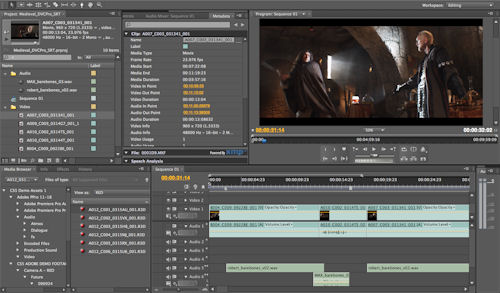
Dozens of timesaving improvements new
Boost productivity with workflow features and enhancements suggested by users like you. For example, use automatic scene detection to create separate clips from HDV tapes, import assets from DVDs, use new keyboard shortcuts, control keyframes with even more precision, and clean up sequences quickly with new commands for finding and removing gaps.
Pinnacle Studio Version 12 - 2010 (ENG/RUS) - 1920 MB

List of effects and plug-ins that are included in this collection:
Pinnacle Hollywood FX Volume 1-3
Pinnacle Premium Pack Volume 1-2
Pinnacle RTFX Volume 2
Pinnacle ScoreFitter Volume 1-2
Pinnacle Themes Winter Pack
Pinnacle Title Extreme
Program & Video Plugins: Boris Graffiti 5.2.3
Video Plugins: BS Effects
Video Plugins: BWPlugins Pack 1-3
Video Plugins: Bravo Studio Pack 1-3
Video Plugins: Camera POV
Video Plugins: Canal +
Video Plugins: Dziedzic Pack
Video Plugins: FX
Video Plugins: JPsEffects 1.1.5.1
Video Plugins: KHT
Video Plugins: MisterZ
Video Plugins: Neat Video 2.21
Video Plugins: NewBlue Video
Video Plugins: Pixelan CreativEase 1.0
Video Plugins: Pixelan SpiceMASTER Pro 2.5
Video Plugins: Stage Tools
Video Plugins: Vance Effects
Video Plugins: Vdub2RTFx
Video Plugins: Vdub2RTFx TimeCode
Video Plugins: WL Filter
Sound Plugins: Alien
Sound Plugins: BIAS SoundSoap 2.01
Sound Plugins: ComboVox
Sound Plugins: NewBlue Audio Bonus Pack
Sound Plugins: NewBlue Audio Enhancements 1
Sound Plugins: NewBlue Audio Essentials 1-4
Pixel 63 Alpha Magic Pack 1 (1189 gradient transitions)
Pixel 63 Alpha Magic Pack 2 (1000 gradient transitions)
Pixel 63 Montage Themes Pack 1
Pixel 63 Montage Themes Pack 2
Corel VideoStudio Pro X3 13.6.2.36

Overview
VideoStudio Pro X3 kicks the movie making process into high gear, giving you the ultimate playground forcreativity. Your complete HD videoediting program, it gives you a rapid head start with professionally designed templates, realtime, studioquality effects, polished titles and smooth transitions.Supercharge your workflow with GPU acceleration and multicore Intel CPU support for faster editing and rendering. Quickly assemble video clips in new Express Edit mode or go deep with advancedvideoediting tools. Then share your videos on YouTube, Facebook, Vimeo, DVD, AVCHD and Bluray discs, iPod, PSP and more.
* Complete HD workflow import, edit, burn and share standard or HDvideo
* GPU acceleration edit and render twice as fast, especially with HD video
* Professional content studioquality RevoStock templates
* Express movie making create movies inminutes, then finetune with advanced editing tools
* Realtime effects work fast with live previews of special effects like RotoSketch
* Bluray authoring & burning author withHollywoodstyle DVD menus
* Online sharing send directly to YouTube, Vimeo, Facebook and mobile device
Sony Vegas Movie Studio HD Platinum 10.0.179 (ENG/RUS)

The Vegas Movie Studio HD Platinum Production Suite includes everything needed for professionallevel video editing, sound design, and DVD/Bluray Disc authoring. Easily edit video including high definition HDV and AVCHD. Create movies to share on DVD or Bluray Disc, portable devices, or online. Vegas Movie Studio HD Platinum Production Suite has integrated tools for video compositing, color correction, and 5.1 surround sound mixing. Use Sound Forge Audio Studio software for precise audio editing and enhance multimedia projects with 400 exclusive music soundtracks.
Professional Level Power for Your Home Studio
Vegas Movie Studio HD Platinum software has everything needed to produce spectacular HD movies. Edit video in nearly any format including HDV and AVCHD. Powerful features for video compositing, color correction, and soundtrack creation help you get featurefilm results in your home studio. Use thesurround sound mixing tools to create 5.1 soundtracks. Choose from hundreds of professional 2D and 3D video effects, titles, and filters. Upload movies to YouTube, burn to Bluray Disc, or author DVDs using beautifully designed themes or your own custom menus and graphics. Exclusive Sony Show Me How interactive tutorials help you get started fast.
FrameForge Previz Studio 3 Stereographic 3D

Designed for the professional filmmaker who wants to work with depth, parallax and screen offset in their real-time Previz, this software program provides all the tools needed to explore the considerations, impact and effect of adding this dimension to your filmmaking. It includes all the features of FrameForge Previz
Studio 3 Pro, plus:
Real-time Stereo Display for viewing your work onscreen in Stereo 3D using most 3-D ready polarized stereo monitors or in anaglyph format on ANY monitor. Three pairs of red/cyan anaglyph glasses included with boxed/CD version.
Fully customizable Side-By-Side & Beam Splitter Rigs allow you to work with the capabilities and limitations of the actual Stereo Camera rigs you’ll be using on the set.
Full Control of Parallax & Screen Plane for any target screen size – from as small as an iPod® up to an IMAX theatre.
Adjust convergence and interaxial with instant updating of parallax values.
Real-Time Reporting of the Current Parallax for every object in the scene with only a simple click on the object in question.
Print 2D or Anaglyph Storyboards, and Export Animatics and Animation in a variety of stereo formats.
FrameForge Previz Studio 3 is currently available in three versions: Core, Pro, and Stereographic 3D. To view the breakdown of each version, and how they differ, please see the Feature Comparison Chart.
When you previsualize your project with FrameForge Previz Studio 3 Stereographic 3D, your final boards will not only be precise and possible to shoot, but they’ll also give your cast and crew a true representation of how to capture your vision, including the technical information required to create that shot on location.
With an incredibly intuitive interface and phenomenal flexibility, FrameForge Previz Studio 3 Stereographic 3D will change the way you plan and film your project. So join the revolution and ranks of professional filmmakers who have discovered the Power of Previz.
