CyberLink MediaEspresso 6.0.0811.2975 (+RUS)
CyberLink MediaEspresso 6 is the successor to CyberLink MediaShow Espresso 5.5. With enhanced CPU/GPU acceleration, MediaEspresso is a faster way to convert your video and your music and image files between a wide range of popular formats. Now you can easily display your favorite movies, songs and photos on iPhone, iPad, PSP, Xbox, Youtube, Facebook etc. Compile, convert and enjoy images and songs as much as you want and enhance your videos to new levels with TrueTheater Technology. Enjoy ultra fast media conversion with MediaEspresso‘s support for the latest hardware acceleration, including Intel® Core™ i7 Extreme Edition, i5, and i3; NVIDIA® CUDA™; and ATI® Stream™ technology.
Use MediaEspresso’s handy batch function to make the conversion process of your media files even faster. Import the files or complete folders, and let MediaEspresso handle the conversion process for you. No need to stick by your computer till the end. Leverage your CPU muscle and transcode efficiently: up to 6 media files at once, thanks to MediaEspresso’s support for Intel’s powerful Core™ i7 Extreme Edition processor. Intel’s CPU utilizes up to 6 processing cores and 12 threads simultaneously.
MediaEspresso now supports up to 59 output devices, including Smart Phones such as the new Apple iPhone 4, Game Consoles and other media players like the iPad, iPod, PSP3, Xbox 360... You can enjoy your media files on nearly any media player.
Always wanted to share your converted video and/or image files on a social platform? Piece of cake with MediaEspresso’s direct export function to YouTube and Facebook. Simply click on the tab of your choice to start the export process.
MediaEspresso makes your media conversion process even easier with the Customizable Favorite Settings functions. Simply save the media profiles of the media players you use the most and enjoy fast access for your future conversions.
Featuring CyberLink TrueTheater™ technology that makes your videos look so much better once they are converted. MediaEspresso not only converts quickly but also improves your video's output quality simultaneously for an enhanced viewing experience on the platform of your choice. Powerful TrueTheater™ Denoise and TrueTheater™ Lightning technologies allow you to improve the overall lighting of your video and remove the noise and artifacts. Not only does MediaEspresso convert videos, it also enhances the video quality for a better viewing experience.
Introducing the new Desktop Gadget for even faster, more convenient file conversions. MediaEspresso now allows you to directly Drag-and-Drop the media files you want to convert to the Desktop Gadget.
As a universal converter, MediaEspresso converts video, image or music files that you can enjoy on the device or social platform of your choice. Regardless of format support, orconversion processes, MediaEspresso makes your life easier and your viewing experience unique!
MediaEspresso makes conversion and playing child's play. No need to memorize media profiles. Simply select the device of your choice and MediaEspresso selects the optimal hardware acceleration setting for your computer.Learn more about all the device supported

Media Convert Master 10.0.2.25 Portable
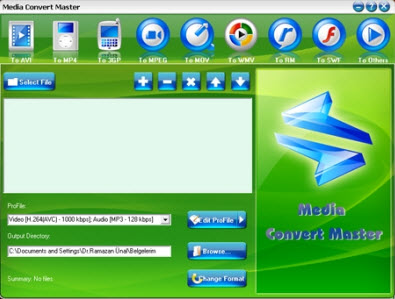
Main Functions:
- Video Conversion
- Audio Conversion
Features List:
It can convert all formats to AVI, MP4, 3GP, MPEG, MOV, WMV, BM, SWF, AAC, AC3, MP2, MP3, AMR, WAV, VOB and ASF.
Adjustable edit profile to add or delete formats at your will.
Batch convert video formats.
Supports any video formats user defined as the output.
You can customize video profiles video and parameters for output video.
Step by Step How to convert a file:
1. Click Open button to add the video files that you want to convert.
2. Click the desired Main Panel button to select a target format that you want to convert to.
3. Then click Edit Profile button to customize profile properties.
4. Set a valid output directory to save converted files before start converting. Click Browse button to select desired output directory or write valid output directory manually.
5. Click the Convert button to start your converting. There will be a new file in your selected output directory.
Supported Formats:
AVI, MP4, 3GP, MPEG, MOV, WMV, RM, SWF, AAC, AC3, MP2, MP3, AMR, WAV, VOB and ASF
Switch Audio file converter

Switch is a sound file application for Windows that converts audio files from many sources into MP3 or WAV format. Switch Converter is very easy to use. Just add the files you want to convert to the list, select the format you want to use, and then click the convert button.
A list of Switch Sound Format Converter features follow but a quick way to try it out is to download and install now. You don't need to purchase to download and it only takes a couple of minutes to complete the process.
Here are some key features of "Switch Sound File Converter":
· Simple and intuitive interface.
· Converts a variety of different audio file formats (including WMA, AU, GSM and DSS formats) into MP3 or WAV format.
· Automatically normalise audio while converting
· Ability to play tracks prior to conversion.
· Import and convert a playlist (m3u and pls).
· MP3 encoder supports constant or variable bit rates from 8 to 320kbps with optional error correction and stereo modes.
· WAV encoder supports sample rates between 6000 and 196000Hz in PCM as well as a number of other audio codecs.
· Allows up to 32000 files to be converted in one batch.
· Can be run from the command line for automation with other applications.
· Optimized CPU usage and efficient code allows for fastest conversion times
· MP3 encoder supports constant or variable bit rates from 8 to 320kbps with optional error correction and stereo modes.
· WAV encoder supports sample rates between 6000 and 196000Hz in PCM as well as a number of other audio codecs.
· Allows up to 32000 files to be converted in one batch.
· Can be run from the command line for automation with other applications.
· Optimized CPU usage and efficient code allows for fastest conversion times.
Supported File Formats:
Converts a variety of audio file formats to mp3 or wav such as:
· wav, mp3, mp2, mpga,
· m4a, ogg, avi, mid
· flac, aac, wma, dct,
· au, aiff, ogg, raw,
· msv, dvf, vox, cda,
· atrac, gsm, dss, sri
· shn, dss, msv, wmv
